Tax & Annual accounts
Digital submission of annual report
Digital submission of annual reports currently works for limited companies that report in accordance with K2 or K3. For other types of companies, this is not yet possible. Bolagsverket does not currently accept annual reports in digital format from trading partnerships, economic associations or housing associations.
- First, make sure that your annual report meets the requirements before submitting.
- When the page opens, the annual report is automatically checked. If something is wrong, you will receive a message – click on it to see what is wrong and go directly to the right page to fix it.
Check your information against Bolagsverket
Ensure that the information matches the Swedish Companies Registration Office's register by clicking on Check against Bolagsverket. Your details will then be checked automatically – the annual report will not be submitted when you do this.
 The following checks will be performed
- The name of the auditor in the auditor report and the auditor in charge (revisorspåteckningen) are the same.
- The corporate identity number and the financial year in the auditor's report and the annual report are the same.
- The currency in the annual report is the same as being registered at Bolagsverket.
- The financial year is not longer than 18 months.
- The date of the annual general meeting is not earlier than the date of the auditor's report.
- The financial year is the same as being registered at Bolagsverket.
- The date for completed audit is not earlier than the date of the annual report.
- The company name in the annual report and the name in the auditor's report are the same.
- The names of the representatives in the documents are the same as the names registered at Bolagsverket on the day the annual report was signed.
- A date for auditor signature is entered.
- The auditor signature contains a statement about the auditor has notrecommended adoptation of financial statements.
- The share capital is the same as being registered at Bolagsverket.
- Select Digitally in the Submission method drop-down.
Before digital submission is possible, you must have...
- … specified all members of the registered board who will sign the annual report. This is done in the Signatures document. Here, the date and location must also be specified.
- selected the option Digitally from Submission method.
- specified who will sign the certificate of approval (a board member or the CEO). This is done on the Certificate of approval document. It is mandatory to specify the following information about the person who will sign the financial statements approval:
- Personal identity number
- E-mail address
- Their role in the board of directors
- specified the personal identity number for the person who will submit the annual report (i.e. the person who pushes the Submit button) in the field Personal identity number under Information about submitter.
Review the file before submitting it. Click on Preview under Annual Report – Submission. The file opens in a new tab and displays the annual report exactly as it will appear at Bolagsverket.
- Select Submit to send a digital copy to Bolagsverket. You will receive a contract text from Bolagsverket that must be approved before the annual report can be submitted. The person who will sign the certificate of approval will receive an email containing a link. The signatory clicks on the link, logs in with BankID or Mobile BankID, and approves the annual report by digitally signing the certificate of approval.
The annual report is not submitted until it is signed digitally.
Remember that the original copy of annual report must be signed by the CEO and all board members. This can be done by signing the document digitally or by printing the annual report.
Once the annual report has been submitted, you can continuously follow its status. The status messages are displayed on the Submission page.
Status messages that can be displayed
- Användaravtalet för Bolagsverkets Eget utrymme måste godkännas för att inlämningen skall kunna hanteras.
- Bolagsverket har skickat ut föreläggande och inväntar komplettering.
- Felaktigheter upptäcktes i årsredovisningen innan inlämning till Bolagsverkets Eget utrymme.
- Inlämningen till Bolagsverkets Eget utrymme misslyckades på grund av tekniska fel i årsredovisningsfilen. Kontakta supporten.
- Företaget har inte skickat in någon årsredovisning som kommit till Bolagsverket än.
- I kö för inlämning till Bolagsverkets Eget utrymme.
- Inlämningen till Bolagsverkets Eget utrymme misslyckades. Försök igen lite senare.
- Inskickad till Bolagsverkets Eget utrymme för signering av fastställelseintyget.
- Kompletteringen av årsredovisningen har kommit in till Bolagsverket och är under handläggning.
- Årsredovisningen har kommit in till Bolagsverket och är under handläggning.
- Årsredovisningen är diarieförd utan vidare åtgärd och inte registrerad som gällande årsredovisning för företaget.
- Årsredovisningen är registrerad av Bolagsverket.
What happens upon submission?
-
A copy (transcript) of the annual report is uploaded, together with the financial statements approval, to the dedicated space at the Swedish Companies Registration Office. There, the financial statements approval needs to be signed by a board member or the CEO. This is done in the Bolagsverkets service Lämna in årsredovisningen digitalt at https://arsredovisning.bolagsverket.se/lamna-in.
-
If an auditor's report is to be filed, the auditor upload it to the same area.
Årsredovisningen is kept at Bolagsverket for 21 days and the financial statements approval must be signed during that period. Reminders are sent after 3 and 18 days. If it's not signed during this period, the annual report must be uploaded again. Note that it's only the financial statements approval that needs to be signed. The other signatures should already be included in the annual report.
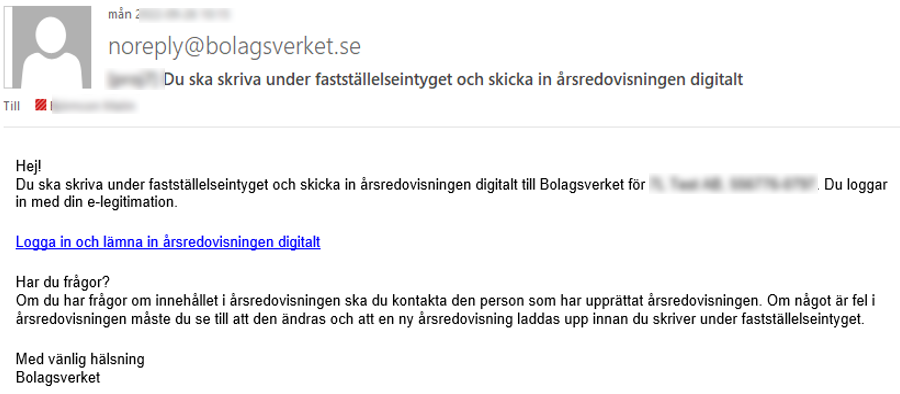
Bolagsverket will automatically send a mail to the e-mail addresses you have entered on the Submission page. The mail looks slightly different if the annual report includes an auditor's report.
-
The signatory clicks the link in the mail and log in with his/her BankID.
If an auditor's report should be included, but is not yet uploaded, a message will be displayed. It's recommended to wait with the signing until it has been uploaded.
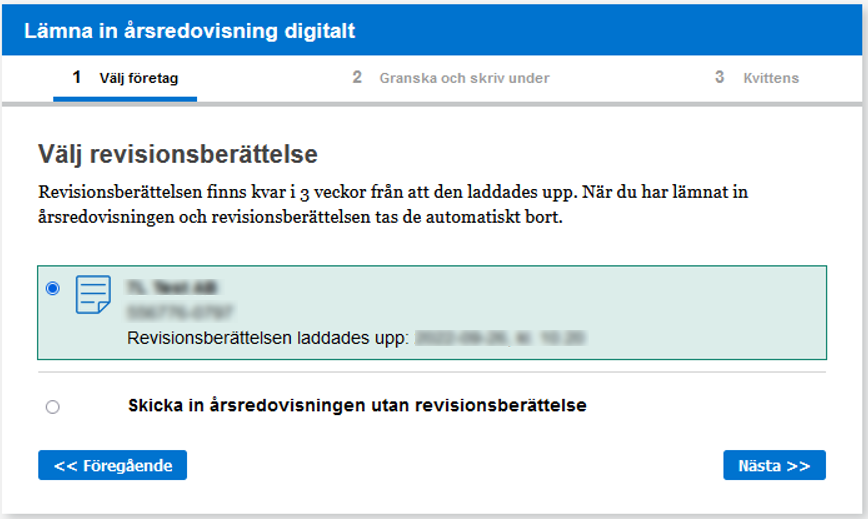
It's possible to submit the annual report without the auditor's report, but if you want to add it later, the whole annual report needs to be uploaded again.
-
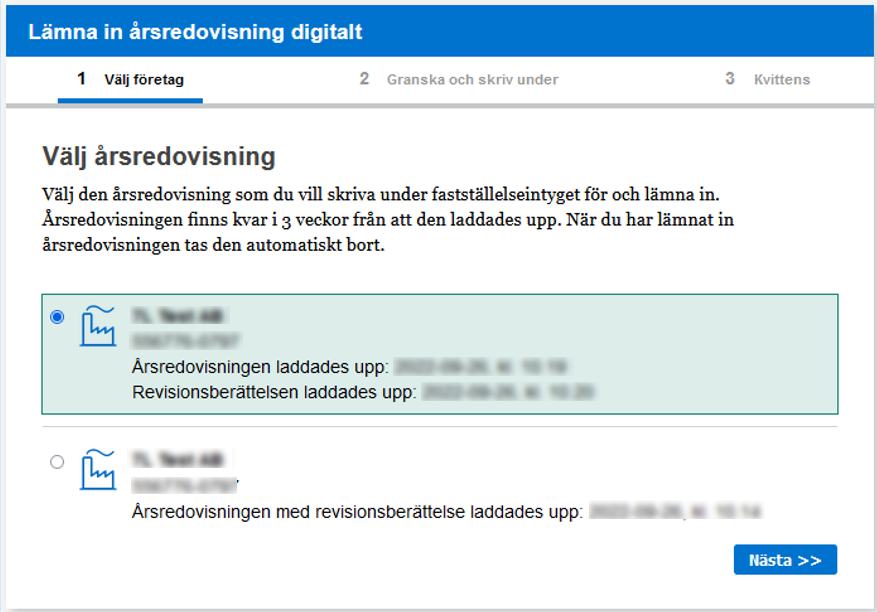
The signatory selects the annual report to sign and selects Next.
-
The signatory selects the auditor's report (if any) and selects Next.
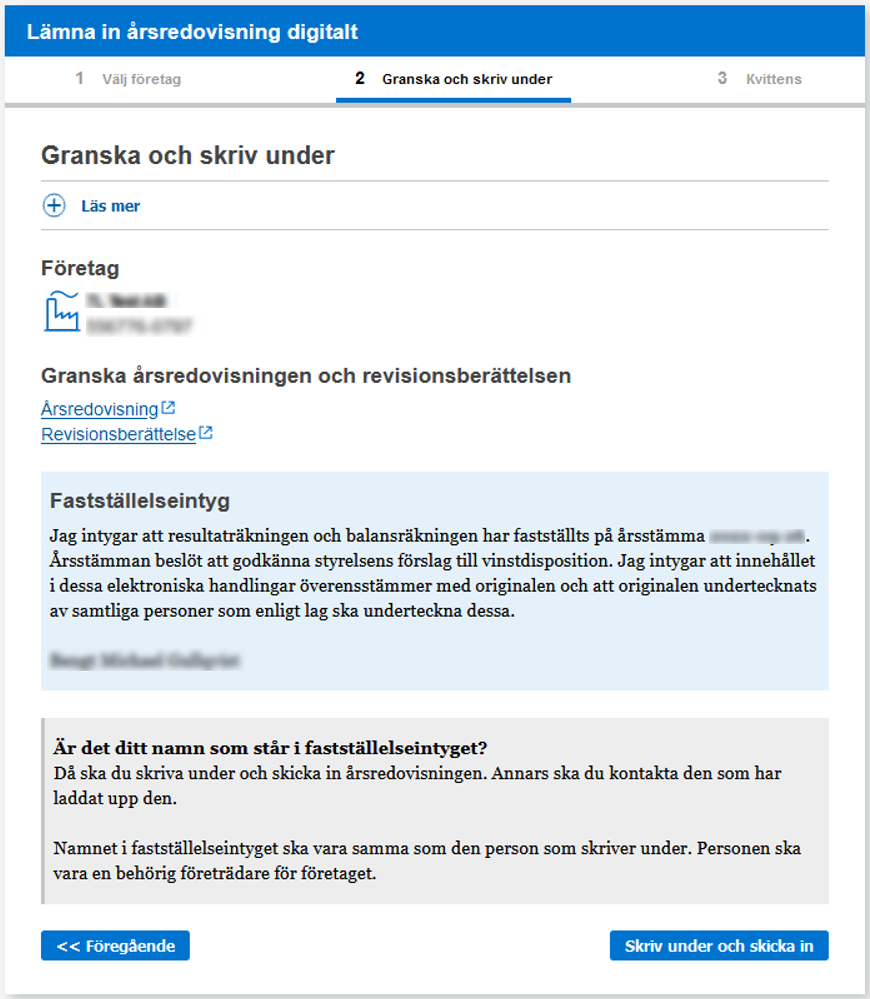
The last step is a review of what will be signed.
Make sure to review the annual report and any auditor's report by clicking their corresponding links.
-
When everything is reviewed and OK, press Sign and Submit.
-
Follow the instructions to sign.
When the financial statements approval is signed and the documents are received at Bolagsverket, a receipt is displayed. Here, it's also possible to send a copy of the receipt via e-mail

You can read more about digital submission of annual reports at bolagsverket.se.
XBRL and Taxonomies
XBRL (eXtensible Business Reporting Language) is an open international XML standard for reporting and storing financial information. It is simply a format for transmitting financial information in a structured way and is used, among other things, for the digital submission of annual reports in Tax & Annual accounts.
A taxonomy is used to define, organise and classify the reporting requirements for financial reports in the XBRL format. For example, there are jointly developed taxonomies for annual reports, consolidated accounts, income declarations, audit reports and statistical reporting. Taxonomies allow reporting in a standardised way so that information can be easily shared, compared and analysed.
The public taxonomies produced by Bokföringsnämnden, Skatteverket, Finansinspektionen, SCB and Bolagsverket can be found at https://taxonomier.se/.
Examples of annual reports, audit reports, certificates of approval and statistical reports can be found at https://www.taxonomier.se/exempel.html.
FAR and Srf konsulterna jointly run the association XBRL Sweden, which has the task of supporting the development of Swedish XBRL-based taxonomies. Read more on their website https://xbrl.se.
Field explanations
Preview
Use this option to preview the digital annual report before sending it to Bolagsverket. The file is opened in a new tab in your browser, where the annual report is displayed exactly like it is presented at Bolagsverket.
Information about submitter
Here, the personal identity number of the person who submits the annual report to Bolagsverket is entered.
Submit
When you select Submit, the annual report is sent to Bolagsverket. At the same time, an email from Bolagsverket is sent to the person who will sign the certificate of approval. This person shall click on the link provided in the email, log in using BankID or Mobilt BankID and approve the annual report by signing the certificate of approval digitally.
Signing of financial statements approval
Here, the information about the person who will sign the certificate of approval is displayed. This information is retrieved from the Certificate of approval document.
-
To receive a confirmation when the signing is complete, enter an e-mail address in the E-mail for receipt field.
-
To send a notification to the auditor when the annual report has been submitted, enter an e-mail address in the Auditor's e-mail for receipt/notification field.
You can add several e-mail addresses for receipts or notifications. Just separate them with a comma.
Status
Here, current information concerning the submission of the annual report is displayed. You can see when the file was sent, by whom and its current status at Bolagsverket. Refresh the page using F5 to get the current status.
Check against Bolagsverket
Performs an automatic check against Bolagsverket. This step can be performed to ensure that the company information entered in your annual report corresponds to the information at Bolagsverket. The annual report will not be submitted by doing this.
The following checks will be performed
- The name of the auditor in the auditor report and the auditor in charge (revisorspåteckningen) are the same.
- The corporate identity number and the financial year in the auditor's report and the annual report are the same.
- The currency in the annual report is the same as being registered at Bolagsverket.
- The financial year is not longer than 18 months.
- The date of the annual general meeting is not earlier than the date of the auditor's report.
- The financial year is the same as being registered at Bolagsverket.
- The date for completed audit is not earlier than the date of the annual report.
- The company name in the annual report and the name in the auditor's report are the same.
- The names of the representatives in the documents are the same as the names registered at Bolagsverket on the day the annual report was signed.
- A date for auditor signature is entered.
- The auditor signature contains a statement about the auditor has notrecommended adoptation of financial statements.
- The share capital is the same as being registered at Bolagsverket.
Related topics
Warnings and errors when checking the annual report
Vägledning till K2 - Årsredovisning i mindre företag (BFNAR 2016:10)
Guidance to K3 - Annual report and consolidated accounts (BFNAR 2012:1)