Tax & Annual accounts
Tax planning for private individuals
You find the tax planning module from Year-end closing - Tax planning. As a first step, the tax planning can be used to calculate the limit amount in close companies.
New 3:12 rules from 2026
The calculations in the module follow the new 3:12 rules, valid from 2026.
From 2026, the current simplification rule and the main rule will be merged into a single rule for all partners. Your amount limit will then be the sum of:
- A basic amount of 4 income base amounts distributed among your shares in the company
- A salary-based scope
- Interest on the part of the overheads amount that exceeds SEK 100,000
-
Saved scope of dividend
The calculation is simplified by removing both the payroll and capital share requirements. Instead, there will be a standardised payroll deduction of 8 income base amounts. The annual interest adjustment of the saved scope of dividend is also removed.
Salary-based scope
In addition to the basic amount, you as a shareholder will receive a salary-based scope. It is still calculated as 50 per cent of the gross salaries paid by the company and its subsidiaries, divided among your shares - but with a deduction of eight income base amounts per partner.
All partners are now able to take advantage of the salary-based scope, as the requirements for salary deduction and capital participation (the four per cent threshold) are removed. The restriction that the salary-based scope can be a maximum of 50 times the own salary still remains.
Salaries of employees of companies owned through an alternative investment fund are not included in the wage base. The special definition of subsidiary that previously applied for the calculation of the salary-based scope is cancelled.
Cost of acquisition and grossing up
You can still include part of the acquisition cost in the limit amount, but the upward adjustment (the government lending rate plus nine percentage points) is only made on the part that exceeds SEK 100,000. The upward adjustment of the dividend space saved from previous years is removed, which will be compensated by the higher basic amount.
The indexation and capital adequacy rules will be abolished, but only in 2029.
How to do a tax planning
For details and examples, see Field explanations.
-
Open the solution from Year-end closing - Tax planning.
-
Add the current tax rates for the private individual on the Basic information tab.
-
Add income from employment and capital and profits from business activities under Basic information - Other income.
-
Go to the Tax calculator page.
-
Click Add tax calculation in the lower left corner and select Qualified shares in close companies.
-
Addinformation about the company and other required settings on the Basic information tab.
-
Enter information about the company's total number of shares and partner events, such as purchases, sales et.c. in the Events tab. Here you also enter special ownership details in case of ownership in several companies and if the spouse owns shares in the company in question.
-
Enter information about the total salaries on the Salary basis tab. Also enter your own salary to calculate the salary-based space.
-
Enter saved scope of dividend and how it's used during the income year on the Saved amount limit tab.
-
Enter date and amount for the year's dividend under the This year's dividend tab. You will get a summary of the distribution between the dividend taxed on capital and employment, respectively.
The link Show calculations - scope of dividend provides a detailed description of how the scope of dividends has been calculated.
-
If the partner has made any sales during the year, a calculation of the profit or loss is shown on the Sales of the year tab.
 Field explanations
Basic information
Basic information
On the Basic information tab, you enter personal information and tax rates that are the basis for the calculations in Tax planning.
Other income
On the Basic information - Other income page, you can add information on income from employment and capital in addition to the income calculated in the Tax calculator section. This ensures that the tax calculations are more correct.
Tax calculator
Basic information tab
On the Basic information tab, enter the details of the close company to which the calculation relates.
Event tab
In the Events tab, enter in chronological order information about the individual owner's own holding of shares and what events has occurred. Most often, you only need to specify a single purchase, that is, when the owner started or took over shares in the company and how many shares were purchased at that time. You can enter all information on historical purchases, sales, share issues, donated gifts and unconditional shareholder contributions.
Spouse of the partner owns shares in the same company
Tick whether the salary deduction should be divided between the spouses. The standardised salary deduction will then be divided between the spouses in proportion to each spouse's share of ownership. An extra line appears where you fill in the other spouse's share of ownership in this company.
Normally, each partner will make a salary deduction of 8 income base amounts (SEK 644,800 for 2026, as the income base amount for 2025 is 80,600). However, for spouses, this deduction must be calculated jointly. If the spouses each own 50 per cent, the salary deduction will instead be 4 income base amounts (322,400).
The payroll deduction itself is then used on the Salary basis tab when calculating the salary-based scope.
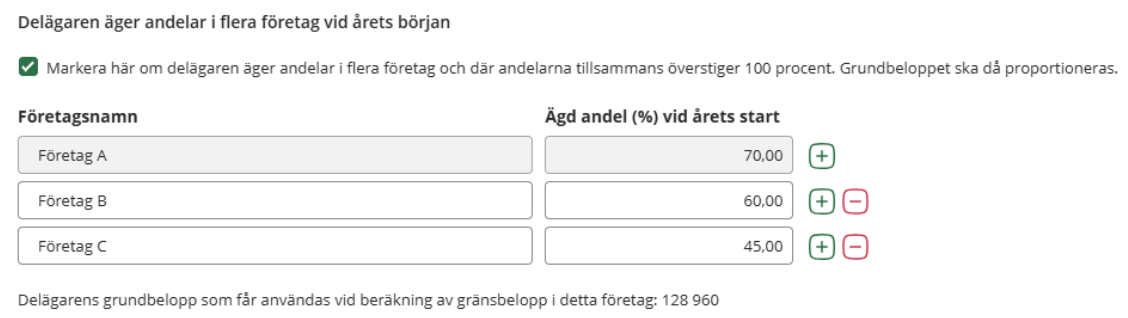
The partner owns shares in several companies at the beginning of the year
Tick if the partner owns shares in several companies and the total basic amount would otherwise exceed four income base amounts. The basic amount is then distributed between the companies in proportion to the share owned.
Normally, the partner may use a basic amount up to a maximum of four income base amounts. This is then allocated according to the share owned in the company. However, if you own shares in more than one company and in total own more than 100 per cent, the basic amount must be allocated.
Examples
You are a partner in three different companies
- Company A (owns 70 per cent)
- Company B (owns 60 per cent)
- Company C (owns 45 per cent)
In company A, the basic amount for the partner then needs to be adjusted. The partner owns 70 out of a total of 175 (i.e. 70+60+45). 70/175 * 4 income base amount.
In 2026, the basic amount for the partner in company A will then be SEK 128,960.
((70/175) * (4*80,600) ) = 128,960
The corresponding basic amount in company B is 110 537 and in company C 82 903.
Salary basis tab
The year's amount limit can only be calculated by the person who owns the shares at the beginning of the year. By this is meant the person who owns the shares on 31/12 the year before the income year to which the amount limit refers.
This means that if the shares are to be sold during the year, only the seller can calculate amount limits during the year of the sale. In order for the salary base to be utilised in the year of sale, the seller must take dividend before the sale. The buyer can never calculate an amount limit for the year in which the shares are purchased, as the buyer does not own the shares at the beginning of the year.
Salary basis for shares acquired the previous year
If you have owned shares for part of the year prior to the income year, you may only calculate salary-based allowances on cash remuneration paid during the part of the year in which you owned the shares. For example, if you have owned shares throughout the year and have purchased additional shares during the year, you will need to make several separate calculations.
Examples
Total salaries in 2025 are 12,000,000, i.e. 1,000,000/month.
-
In 2024, you purchase 10 shares.
-
On 1 April 2025, you purchase 40 shares
-
On 1 September 2025, you purchase 30 shares.
You own 10% for the entire year 2025. The salary basis for these will then be 12,000,000 * 10% = 1,200,000.
On 1 April 2025, an additional 40 shares were purchased, followed by a further 30 shares on 1 September 2025.
-
This means that you own an additional 40 shares during the period 1 April 2025 – 31 August 2025 (5 months).
-
The salary basis for this period is 5,000,000.
-
5 000 000 * 40 % = 2 000 000
-
For the period 1 September 2025 to 31 December 2025 (4 months), you will own 70 new shares in 2025.
-
The wage bill for this period is 4,000,000.
-
4 000 000 * 70 % = 2 800 000
Total salary basis based on ownership share is 6,000,000 (1,200,000 + 2,000,000 + 2,800,000)
Saved amount limit tab
When you work with the Qualified shares in close companies calculation, you need to fill in any dividend space saved from the previous year. You can do this easily under the tab Saved limit amount.
Have you sold shares during the year? Not a problem! When you register a disposal under the Events tab, we automatically calculate new threshold amounts based on your specified distribution and sale dates.
Of course, you can always make your own adjustments to the saved space - but this is only necessary in special cases. You can adjust the amounts both before and after the end of the year. Remember to enter minus in front of the amount to be deducted.
No upward adjustment of the dividend savings from 2026
A new feature from 2026 is that the saved dividend space will be carried forward to the next year without interest rate adjustment. Previously, the saved dividend space was calculated using the government borrowing rate plus three percentage points.
Dividend of the year tab
At the top of the Dividend of the year tab, the amount calculated as a dividend is displayed. This amount is taxed at 20% in capital tax with the recipient.
Via the link Show calculations - scope of dividend, you can see a detailed description of how the scope of dividends has been calculated.
In the Dividend of the year tab, do as follows:
- Enter the dividend date for the income year.
If a dividend has been paid during the year, the date of the dividend must be stated. This is especially important when there have been sales during the year.
- Enter the amount for this year's dividend.
Once you have entered the amount of the year's dividend, you will see how much of the dividend is taxed on capital and whether any part will be taxed as income from employment.
Related topics
Searchwords : private tax planning, close companies, tax calculation, tax planning